Build a glowing anime city in a few minutes.
Sprawl builds a stylized anime night city in Blender. Shape towers from sliders, click Make City for an endless glowing skyline, and go back to edit any building whenever you want. Towers, night sky, endless skyline — on a laptop, in EEVEE. No render farm.
One-time purchase · no subscription · GPL-3.0 · Blender 5.1 · EEVEE-first
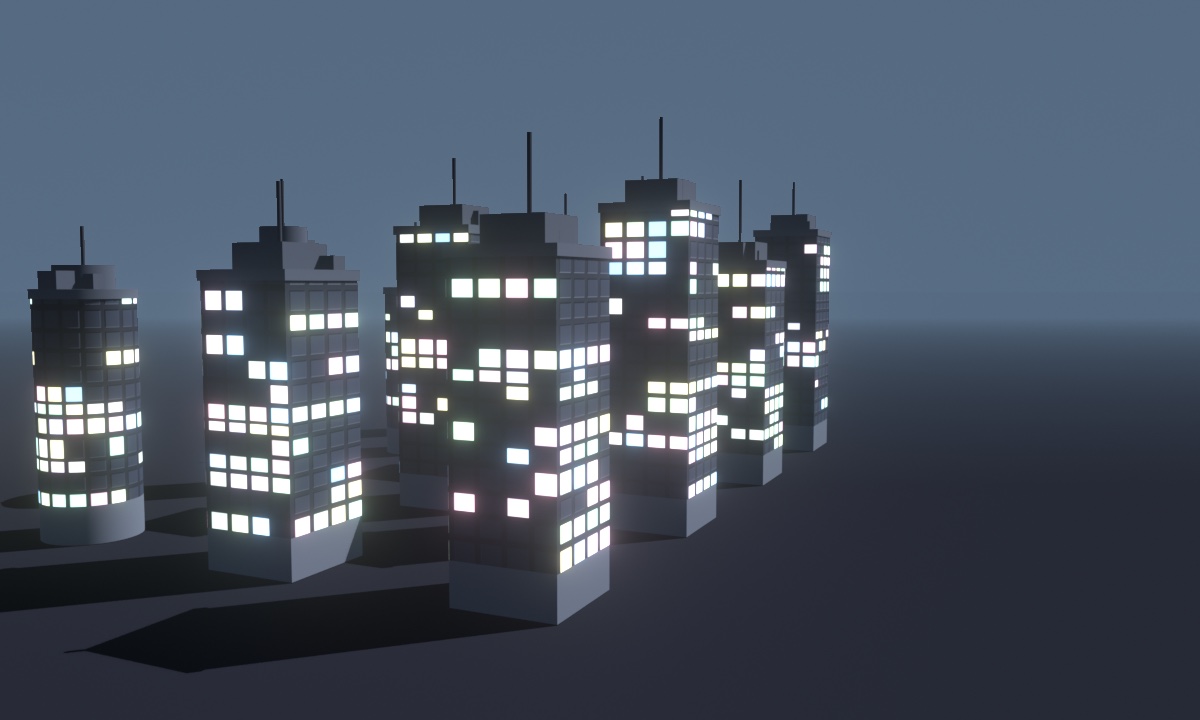
Building an anime city in Blender with Sprawl.
What it does.
A whole anime city — towers, night sky, and an endless skyline — from sliders and one button, and editable the whole way.
Towers from sliders
Shape each building from base, middle, and top — box, round, or oval, with its own concrete color and dense proportional windows. Randomize rolls a whole new tower and drops it in a row so a skyline builds itself.
One-click Make City
Click Make City and Sprawl arrays your buildings into an endless glowing skyline — collection instances, so it stays light enough to run on a laptop. Random placement, turns, and empty lots keep it from looking tiled.
Edit ↔ City, any time
Switch to Edit, tweak one building, and Show City rebuilds the skyline from your templates — the change reaches every copy. Go back and change your mind as often as you like; you are never locked into a baked city.
Night sky, sun & moon, haze
A day/night sky rig with a visible sun and moon and screen-space distance haze, so far towers fade into the horizon color and the city reads as endless. Tuned for the pastel-window, glowing-night anime look.
EEVEE-first — laptop-friendly
Built for EEVEE, so you get a full glowing city in the viewport and out of a render in minutes — no render farm, no overnight Cycles bake, no KitBash-sized download.
Local, GPL-3.0 add-on
One folder-package zip, installed from disk. It works offline, on your machine — nothing to sign into, nothing that phones home.
How it works.
Build a few buildings, make a city, then edit your mind — the skyline updates with you.
Shape a few buildings from the sliders — footprint, floors, windows, shape, and color. Randomize for instant variety.
Arrays your buildings into an endless skyline of instances, with the night sky, sun & moon, dark street, and distance haze set up for you.
Jump back to any building, change its windows or color, and Show City flows the edit through the whole skyline. Repeat as much as you want.
Buy it once. Build cities forever.
A Blender add-on, $49 one-time — no subscription. Install the zip and it’s yours on your machine, GPL-3.0, offline. Want to make facade maps by hand first? Facadr is free in your browser.
Questions.
What is Sprawl?
Sprawl is a Blender add-on that builds a stylized anime / toon night city. You shape towers from sliders — base, middle, top, per-building concrete color, dense lit windows — then click Make City and it arrays them into an endless glowing skyline. It ships a day/night sky with a visible sun and moon and distance haze so the far towers dissolve into the horizon.
Which Blender version does it need?
Blender 5.1, EEVEE-first (the materials are Cycles-compatible too). Because it targets EEVEE it runs on a laptop — you do not need a render farm to get a glowing night city.
Can I go back and edit a building after I build the city?
Yes — that is the headline. Sprawl has a two-mode Edit ↔ City workflow: the city is made of instances of your template buildings, so you switch to Edit, tweak one building’s windows or color, click Show City, and the change flows to every copy. You are never locked in.
Do I need Facadr to use it?
No. The facade-map engine is built into the add-on and runs offline. Facadr (free, in your browser) is the companion if you want to make or edit facade maps by hand — but Sprawl does not require it.
Is it photoreal or stylized?
Stylized — a dreamy anime / toon night (there is a day preset too). It deliberately is not gritty photoreal cyberpunk. That whimsical anime-city look is the whole point. Where Sprawl differs from the other stylized city tools is that it is built night-first — a glowing lit-window skyline with a day/night sky, a visible sun and moon, and distance haze — and it targets current Blender rather than a version from several years ago.
Can I sell what I make with it?
Yes. Your renders and animations are yours — use them in client work, films, streams, whatever you like.
Is Sprawl a subscription?
No. Sprawl is a one-time purchase — $49, yours to keep. Install the zip in Blender and it works forever, on your machine, offline. No subscription, and no account required to buy it.